Easily manage and edit your customer and supplier invoices thanks to a key feature that improves presentation and customisation.
Our Invoice header / footer / text extension lets you add headers, footers and line texts to PDF editions of customer and supplier invoices. It can be used with GESBIC and GESBIS, making your documents easier to read and more compliant.
Generate your Accounting Entries File (FEC) without closing your financial year or period.
Sage X3 allows you to generate the Accounting Entries File (FEC) for each company for a closed fiscal year, intended for the tax authorities. As this format is becoming a standard for exchanges with your financial partners, this extension will enable you to generate it without closing the fiscal year beforehand.
Simplify the transfer of accounting entries by importing a file in FEC format directly into Sage X3.
The FEC Import extension provides you with a ready-to-use integration template, designed to ensure a smooth start and drastically reduce the time your teams spend on data entry during transition phases.
An effective solution for centralising your accounts:
Improve the standard operation of reminders in Sage X3.
By default, in the standard version, Sage X3 does not allow you to send reminders for overdue invoices. Our Enhancement Customer Reminders extension automates this process directly within X3.
Automate your bank reconciliation process and gain greater visibility over your cash flow.
The Advanced Bank Statement Import extension transforms your standard French CFONB bank statement files into enriched data streams, ready to be used by the advanced reconciliation and matching functions within Sage X3.
Move beyond simple statement viewing and streamline the daily processing of your financial transactions.
Key benefits for your finance team
ADDED VALUE
A modern approach to financial management. By transforming a traditional banking format into high-value business data, you provide your finance teams with a powerful tool for monitoring and managing cash flow on a daily basis.
Send your payment notifications to your suppliers directly from Sage X3 via email and avoid unnecessary reminders with our Transfer Supplier Notice by email extension.
With our extension, you can enhance the core Sage X3 system by securing your supplier processes.
Any creation or modification of a supplier’s bank details must then be approved by a validator specified in each user profile.
Secure your payments with our extension featuring double validation of supplier bank details.
Streamline your financial operations with our innovative automatic integration of exchange rate extension for Sage X3.
Save time by automatically integrating exchange rates on a daily basis.
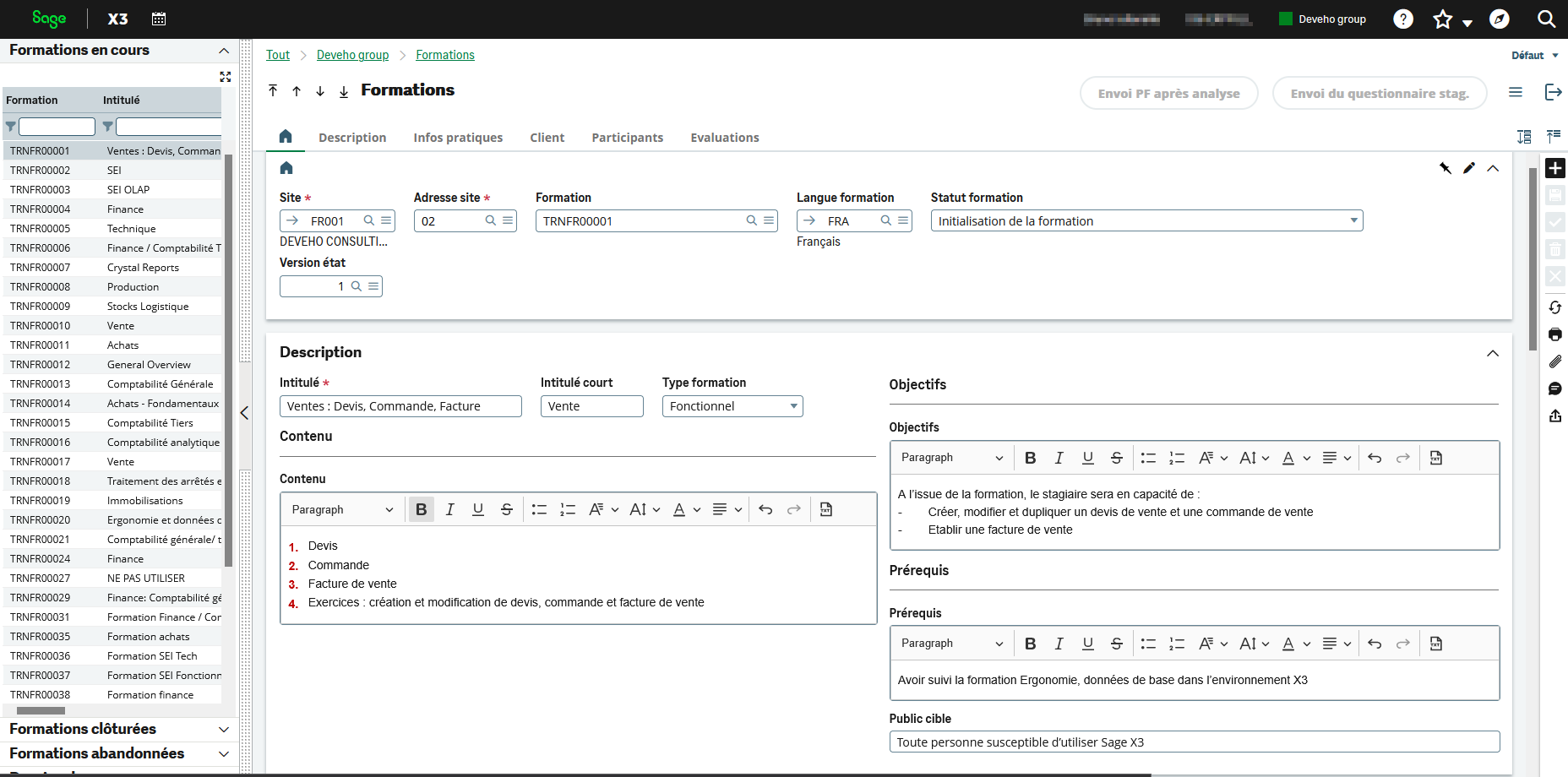
Deveho is a Qualiopi-certified training provider that can meet all your training needs with its Sage X3 training module.
Our training module is specially designed to integrate seamlessly with Sage X3 and is structured in accordance with Qualiopi certification standards, simplifying and optimising your training process.
Need to sign documents electronically and collect legally binding signatures?
OodriveSign provides a comprehensive electronic signature solution, covering contract digitalisation, compliance management, data collection, and document signing capabilities, whether remotely, face-to-face, or online.
Submit, send and manage electronic signatures directly from Sage X3 with OodriveSign.
Europe’s leading trusted collaborative suite.
Manage stock allocation across companies in Sage X3 without the need for intercompany stock transfers.
With our Multi-Company Stock Flow extension, you can process sales orders without creating intercompany transfer orders.
The Sales Order Emailing extension – 00260 allows you to automate and simplify sending orders directly via email from Sage X3. Thanks to this extension, you can dispatch orders to customers in just a few clicks without leaving the sales module, whilst ensuring efficient tracking of all communications.
Optimise your customer relations and accelerate your dispatch processes.
The Automated Delivery Note Emailing extension integrates a fluid, smart, and instantaneous management system for sending your logistics documents directly from your ERP. Save valuable time daily and keep your customers informed in real time as soon as their goods are ready or dispatched:
THE BONUS
A scalable solution. This extension shares a common foundation with other document-sending modules (purchasing and sales), guaranteeing perfect harmony and great simplicity of configuration across your entire commercial management.
Optimise your cash flow and reduce your administrative processing times.
The Automated Sales Invoice Emailing extension allows you to digitalise, print, and instantly dispatch your customer invoices directly from your Sage X3 commercial workflow. Modernise your invoicing process and boost daily efficiency thanks to features designed specifically for your accounting teams:
THE BONUS
Perfect synergy. This module integrates harmoniously with your other document-sending tools (orders, deliveries) to provide your business with a comprehensive, consistent, and centralised customer communication solution.
Optimise the quality and utilisation of your common data with extensions that improve the structure of your items and automate accounting rules to suit your operational context.
Add dynamic technical specifications to your product records to enhance your product catalogue management in Sage X3. Dimensions, power ratings, dates and lists of values can be easily configured and utilised in your processes and reports.
Assign a different accounting code to the same item depending on the site, so that each stock movement automatically generates the correct accounting entries. Ideal for multi-site organisations that want to avoid duplicate items and manual corrections.
Extensions that enable you to make your MRP processes smarter by tailoring procurement and forecasting to the specific circumstances of each site and actual consumption levels.
Define a different supplier for the same item depending on the site so that the MRP automatically generates the correct purchase suggestions. Each site thereby purchases from the right supplier, without the need for manual corrections.
Automatically generate demand forecasts based on past actual consumption to improve MRP accuracy. A simple and effective way to anticipate requirements without maintaining manual, item-by-item forecasts.
Your business’s performance depends on the smooth flow of its procurement processes. Deveho’s extensions for the Sage X3 Purchase module have been designed to automate your low-value-added administrative tasks, from invoice receipt to order dispatch.
Automate and secure the sending of your purchase orders
Optimise your supply chain and save valuable time daily. The Emailing purchase orders extension integrates a native, smart, and automated management system for sending your supplier purchase orders via email, directly from your ERP. No more time-consuming tasks or risks of error associated with manual sending. Thanks to this extension, you can manage your purchasing workflows with maximum agility:
Bulk or individual sending: Process your orders on the go or launch batch sending campaigns in a single click.
Personalised communication: Benefit from a dedicated function to configure and personalise the text of your accompanying emails.
Control and flexibility: Stay in control of your workflows by adding an ‘Exclude from email sending’ option directly onto the supplier record or the relevant order.
Security and compliance: The extension includes a native security filter. Only validated, approved, and digitally signed documents can be sent, thereby preventing any external communication errors.
Intuitive management: Two new buttons (‘Send via email’ and ‘Reset sending’) integrate seamlessly into your order screen for immediate adoption by your teams.
THE BONUS
The module adapts to your multi-site organisation by allowing you to define the report template to be used for each site or subsidiary (layout, logo, legal notices).
An inventory balance report providing a clear view of opening and closing quantities and values for the period. Ideal for financial audits, valuation tracking, and period-end closures.
A report detailing all stock movements per item over a period. It allows you to analyse stock trends, understand variations, and justify discrepancies.
Quickly and securely import your key data (invoices, journal entries, stock, etc.) from Excel using ready-to-use import templates for Sage X3. An efficient solution to accelerate migrations and reduce manual data entry.
Analyse the actual usage of your Sage X3 by tracking the functions, reports, and transactions used by your operators. Ideal for identifying critical processes, optimising system utilisation, and de-risking your migration projects.
Personalise and structure your PDF exports.
Give meaning to your exported documents. By default, the reports and layouts generated by your ERP often bear technical or standardised names, which are not very clear to your staff or customers. The Automatic naming of printing reports extension solves this problem by allowing you to define smart, dynamic naming rules for all your documents (PDFs, etc.). Thanks to a configurable formula set directly at the report definition level, your files are named clearly and structured as soon as they are generated. The extension automates and optimises your file management according to your specific workflows:
Print Preview: Your files are instantly renamed with the specific defined name, then cleanly downloaded and ready to use.
Local or network file generation: The file name field is automatically pre-filled with the correct extension. You retain the freedom to modify the name on the fly or specify a target network directory to archive your documents.
Automated email sending (Workflows): Connected to your ERP’s workflow mechanisms, the extension renames the document before automatically sending it via email as an attachment to the configured recipient.
THE BONUS
A seamless solution for the user. Configuration is done once and for all in the background. Your teams simply click the usual print button, and the extension takes care of the rest.
Improves the administration and traceability of Sage X3 interfaces through direct access to queries from recurring tasks and intelligent management of import/export file names.
The result: batch processes that are clearer, better tracked and easier to maintain.
Easily manage and edit user permissions by exporting access rights to Excel and then re-importing them into Sage X3. A quick and efficient way to manage user profiles and maintain a clear overview of permissions.
Automatically delete inactive user sessions to free up access and maintain the performance of your ERP system. A simple solution to prevent ghost connections and ensure your Sage X3 environment always runs smoothly.
Automate and secure your file exchanges with Sage X3
Connect your systems with total peace of mind. The Deveho Transfer (sFTP) extension eliminates tedious manual interventions by automating the sending and receiving of your files (orders, invoices, bank statements, etc.) between your external servers and your Sage X3 ERP. Leveraging ultra-secure protocols (SFTP with SSH key exchange, FTP), this module manages your data flows in the background based on entirely customisable scenarios. Total autonomy and enhanced security for your ecosystem:
Native Sage X3 integration: The extension automatically generates the folder paths within your ERP, drastically simplifying daily configuration and use.
Smart collection and distribution (Get / Send): Retrieve or send your files automatically. The module includes advanced inclusion/exclusion filters and scans sub-folders recursively to process only the relevant data.
Secure post-transfer actions: To avoid any duplicates or data loss, the extension validates the success of the transmission before archiving or deleting local or remote files.
Scheduling and autonomy: Schedule your transfers at regular intervals (hourly, nightly, etc.). Your data is continuously synchronised without any human intervention.
THE BONUS Total traceability. The extension generates detailed error reports and activity logs for every action (copying, archiving, deleting) for permanent control over your workflows.
Synchronise your Sage X3 environments in a single click
Secure and simplify the management of your test and development environments. The Automation of Sage X3 folder copy extension eliminates tedious manual data copying tasks by fully automating the export, transfer, and import cycle of your Sage X3 folders. Ideal for IT teams and ERP administrators, this command-line tool standardises data movements to eliminate any risk of human error or corrupted files. Benefit from an industrialised and agile approach to environment management:
Refresh Mode (Prod to Test): Update your test folders with actual production data in a completely automated manner.
Duplication Mode: Create new folders or carry out your data migrations via a single, scripted workflow.
Smart Scheduling: Easily integrated with Windows Task Scheduler, the tool runs entirely autonomously.
Selective and optimised transfer: The extension automatically identifies linked files and allows you to exclude unnecessary bulky data (such as temporary .tmp files or heavy log directories) to considerably speed up transfer times.
THE BONUS
Total traceability. Each operation generates a detailed log file. In the event of an anomaly, an error status (KO) is immediately returned to enable ultra-fast resolution by your administrators.
Optimise your Sage X3 server space with total autonomy Prevent unnecessary server clutter caused by the automatic accumulation of activity log files. The Logs Files Management for folders extension takes care of your system’s maintenance by automating the sorting, archiving, and regular cleaning of your bulkiest logs. Ideal for guaranteeing high system performance, this smart tool maintains optimal storage space without any action on your part and without disrupting your staff. Benefit from a fluid and seamless data cleanup:
Accounting log sorting: The system automatically identifies accounting-related tracking files, sorts them, and retains only the 7 most recent versions.
Background process maintenance: The extension also handles the bulky files generated by system background tasks, keeping only the essential historical data.
Secure and dated archiving: Before any permanent deletion, recent documents are set aside in an archive folder and dated so they remain easily accessible to your teams if needed.
Scheduling and peace of mind: Perfectly integrated into your work environment, the extension is designed to run automatically at regular intervals for continuous, invisible maintenance.
THE BONUS
Total security. The extension precisely monitors every sorting or deletion action and stops instantly in the event of an anomaly to absolutely protect your data.
Automatically free up your ERP disk space
Over the course of its daily use, your system generates a multitude of temporary and technical tracking files that eventually saturate your server space. The Logs Files Management for runtime extension takes over from your teams by automating the rotation, archiving, and deletion of these invisible yet cumbersome files. It guarantees a lighter, high-performing server and a healthy IT infrastructure, without you ever having to think about it. Benefit from completely invisible system optimisation:
Temporary file cleanup: The extension combs through system directories to identify all short-lived working files that are no longer required for business operations.
Smart retention rule: To guarantee total security, the module moves these files into a secure, dated archive folder, permanently deleting only items that are older than 30 days.
Background automation: No manual intervention is required on your part. The tool is designed to run entirely autonomously and seamlessly, without ever slowing down your users’ work.
THE BONUS
Rigorous monitoring. Although the process is fully automated, the extension logs a precise activity report for every cleanup action, ensuring your technical teams always maintain perfect visibility over your server’s health status.
Whether you would like to receive product documentation or see one of our modules in action during a live demo, we are here to help.
How to proceed?
Fill in your contact details.
State the extension reference number you are interested in within your message.
Specify your requirements (Brochure / Demo / Pricing inquiry).
Our team will get back to you within 48 hours to assist you with your project.